

For growing organisations, IT support quickly becomes more than an operational function. It becomes a strategic decision that affects productivity, security, resilience and user experience.
As your business becomes more dependent on cloud platforms, cyber security tools, collaboration applications and connected devices, the question is no longer simply “who fixes IT issues?” It is:
“what support model gives our people the best service, protects the business and scales with us?”
For some organisations, that means building and retaining an in-house IT service desk. For others, it means partnering with an outsourced IT support provider. In many cases, the right answer is a hybrid model that combines internal knowledge with external expertise.
This decision is becoming more important as the skills required to run a secure and reliable IT environment continue to grow. According to the UK Government’s Cyber Security Skills in the UK Labour Market 2024 report, 44% of UK businesses have basic technical cyber security skills gaps, while 27% have gaps in advanced technical cyber security skills. For many organisations, this makes it difficult to maintain all the expertise they need internally
At Nexus, we have spent over 25 years helping organisations move between fully in-house IT teams, fully outsourced models and hybrid approaches. We understand the operational, financial and technical considerations behind each route — and we know that the best model is the one that fits your organisation, not the one that looks best on paper.
There is no universal answer. The right choice depends on your size, budget, internal skills, risk profile, compliance requirements and the level of service your users expect. An in-house service desk can offer close cultural alignment and direct control. An outsourced service desk can provide broader expertise, predictable costs, stronger resilience and extended coverage without the recruitment burden.
If you are reviewing your current IT support model, this guide will help you assess your options with greater clarity.

What Is an In-House IT Service Desk?
An in-house IT service desk is a support function employed directly by your organisation. Your own IT staff are responsible for handling user issues, device problems, software queries, access requests, cyber security processes and day-to-day troubleshooting.
This model gives you direct control over your team, priorities, internal processes and service culture. It can work well for organisations with highly specific systems, complex workflows, strong on-site requirements or established internal IT leadership.
However, running an effective in-house service desk requires more than hiring technical people. You also need to manage recruitment, training, holiday cover, sickness cover, documentation, tooling, escalation routes, security processes, performance management and ongoing technical development.
As your organisation grows, these demands usually increase. A small internal team can quickly become stretched, particularly when they are expected to support users, manage infrastructure, deliver projects, maintain security and keep pace with changing technology. Without the right structure, an in-house service desk can become reactive rather than strategic.
What Is an Outsourced IT Service Desk?
An outsourced IT service desk is delivered by an external IT support partner, such as a managed IT service provider. Instead of building and managing a full support team internally, you gain access to a wider team of engineers, service desk tools, escalation processes and specialist technical expertise.
A well-run outsourced service desk can support users across day-to-day IT issues, remote troubleshooting, Microsoft 365 administration, device management, patching, backup checks, cyber security monitoring, user onboarding, access control and more advanced technical escalation where required.
For many organisations, outsourcing provides a practical way to improve service quality, resilience and coverage without adding internal headcount. It also reduces reliance on one or two key individuals and gives your business access to a broader range of skills than most internal teams can maintain alone.
At Nexus, our service desk is designed to act as an extension of your organisation. We focus on responsive user support, clear communication, reliable processes and long-term improvement across your IT environment. The goal is not just to close tickets, but to help your people work effectively while giving your leadership team better visibility, control and confidence.

In-House IT Service Desk: Key Advantages
The biggest advantage of an in-house team is control. Your IT staff are part of your organisation, understand your culture and may build close relationships with users across the business. They can be physically present when needed and may have deeper knowledge of internal systems, legacy applications and business-specific processes.
An in-house team can also be highly responsive to internal priorities, especially where IT is deeply embedded in daily operations. For organisations with very bespoke environments, regulated processes or high volumes of on-site work, that closeness can be valuable.
But this control comes with responsibility. You need to keep the team trained, motivated, covered and equipped.
In-House IT Service Desk: Common Challenges
Building a strong internal service desk is not just about hiring one or two capable engineers. You need enough capacity to cover peaks in demand, annual leave, illness, projects, escalations and out-of-hours requirements.
Common challenges include:
- Recruitment and retention: Skilled IT staff are in high demand, and hiring can be expensive and time-consuming.
- Single points of failure: If key knowledge sits with one person, absence or resignation creates risk.
- Limited breadth of expertise: A small internal team may struggle to cover networking, cloud, cyber security, infrastructure, compliance and end-user support equally well.
- Management overhead: Internal teams need leadership, training plans, performance reviews, documentation and ongoing investment.
- Hidden costs: Salaries are only part of the total cost. You also need to consider tools, licences, training, pensions, recruitment fees and cover.
For smaller and mid-sized businesses, these hidden costs can make an in-house service desk more expensive than expected.
Outsourced IT Service Desk: Key Advantages
The main benefit of outsourcing is access to a wider pool of expertise without needing to employ every skill internally. Instead of relying on one or two people, you can access a structured team with different specialisms, escalation routes and service management processes.
An outsourced IT support model can also provide more predictable costs. Rather than dealing with unexpected recruitment needs, tool purchases or training gaps, you usually pay a regular service fee aligned to your support requirements.
Outsourcing can also improve resilience. A good provider will have processes for ticket management, monitoring, documentation, holiday cover, escalation and reporting. This helps reduce dependency on individuals and gives your users a clearer route to support.
Outsourced IT Service Desk: Things to Consider
Outsourcing does not mean handing over responsibility and hoping for the best. The success of the model depends heavily on choosing the right partner and setting clear expectations.
Before outsourcing your IT service desk, you should consider:
- Service levels: What response and resolution targets are included?
- Coverage: Is support available only during business hours, or do you need extended hours?
- Escalation: How are complex issues handled?
- Knowledge transfer: How will the provider learn your systems, users and processes?
- Communication: Will users get clear updates and a professional support experience?
- Security: How will access, permissions and sensitive data be managed?
- Reporting: Will you receive useful insight into ticket trends, recurring issues and service performance?
The cheapest provider is rarely the best choice. You should look for a partner that understands your business, communicates clearly and can scale with you.

Cost Comparison: In-House vs Outsourced IT Support
When comparing costs, it is easy to look only at salaries versus a monthly support fee. That does not give you the full picture.
An in-house service desk may include:
- Salaries, pensions and National Insurance
- Recruitment fees and onboarding
- Training and certifications
- Service desk software and monitoring tools
- Device management platforms
- Cyber security tools
- Holiday, sickness and out-of-hours cover
- Management time
- Escalation support from third parties
An outsourced service desk usually bundles many of these elements into a predictable monthly cost. This can make budgeting easier and reduce the risk of unexpected operational gaps.
That said, in-house support may still be the right investment if your organisation has sufficient scale, complex internal requirements or a strong need for dedicated on-site resource.
Which Option Gives Better User Experience?
User experience depends less on whether the service desk is in-house or outsourced, and more on how well it is run.
A great in-house team can deliver excellent support if it is properly resourced, trained and managed. A great outsourced provider can also deliver excellent support if they understand your business, communicate well and operate as an extension of your team.
The warning signs are similar in both models:
- Users do not know where to go for help
- Tickets are not logged or tracked properly
- Issues are repeatedly fixed without addressing root causes
- Support depends too heavily on one person
- There is little reporting or visibility
- Projects constantly interrupt day-to-day support
- Cyber security and maintenance tasks are missed
The best service desk model is the one that gives your users reliable, consistent and secure support.
Is a Hybrid IT Service Desk the Best Option?
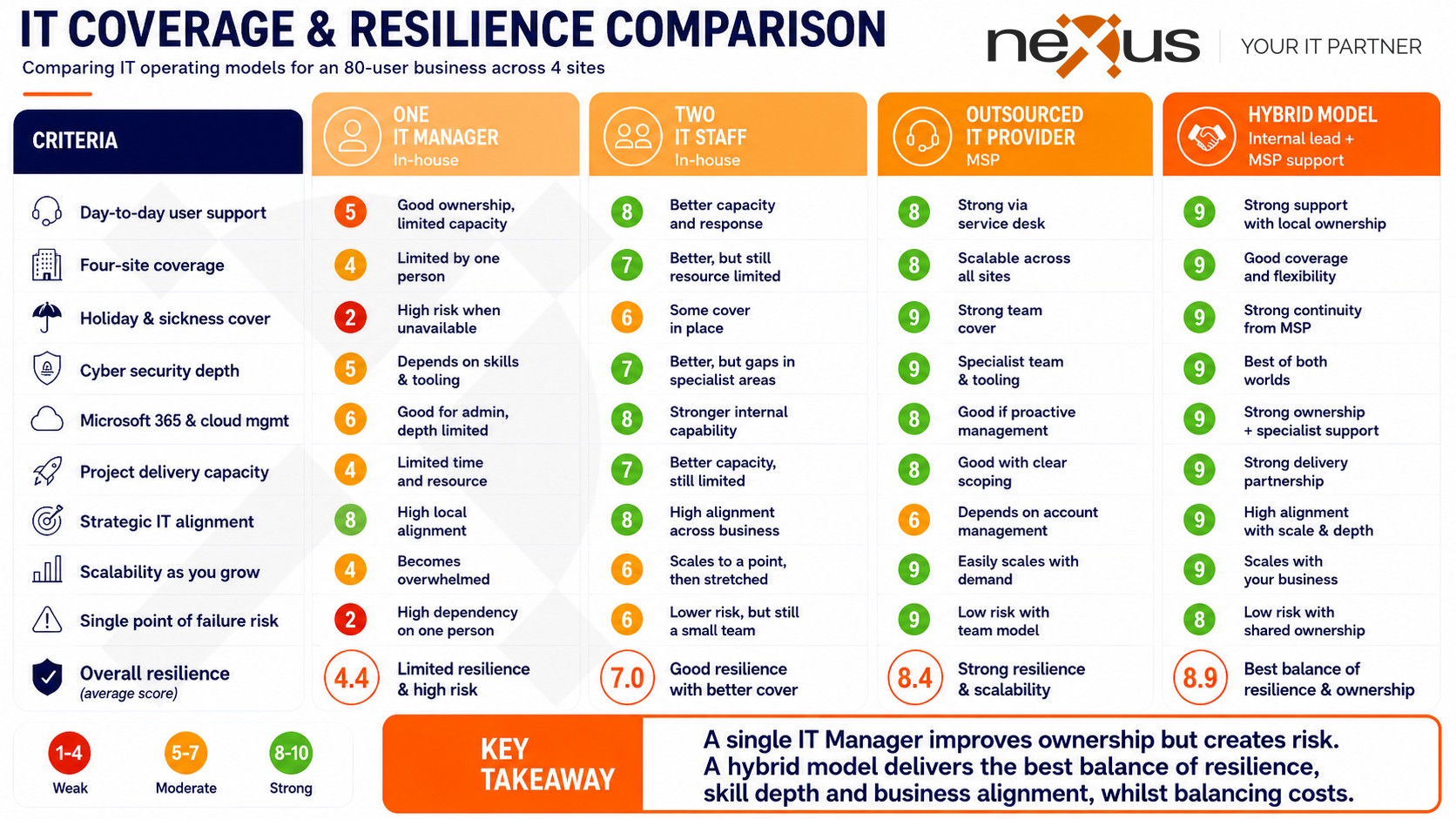
For many organisations, the answer is not strictly in-house or outsourced. A hybrid IT support model can offer the best of both.
For example, you may keep an internal IT manager or technical lead who understands the business and owns the IT strategy, while outsourcing first-line support, monitoring, cyber security operations or specialist escalation.
This approach gives you internal control while still benefiting from external capacity and expertise. It can be particularly effective for growing organisations that need more structure but are not ready to build a full internal team.
Questions to Ask Before Making a Decision
Before choosing between in-house and outsourced IT support, ask yourself:
- How many users, devices and locations do you need to support?
- Do you need on-site support every day, or only occasionally?
- Can one internal engineer realistically cover all required skills?
- What happens when your key IT person is on leave or leaves the business?
- Do you need support outside standard working hours?
- Are your cyber security, backup and patching processes consistently managed?
- Do you have clear reporting on ticket trends and recurring issues?
- Is your current support model helping the business grow, or holding it back?
- Would predictable monthly costs help with budgeting?
- Do you need strategic IT guidance as well as day-to-day support?
Your answers will quickly show whether an in-house, outsourced or hybrid model is the best fit.
So, Should You Build or Outsource Your IT Service Desk?
If you need maximum internal control, have the budget to recruit and retain a skilled team, and require frequent hands-on support, an in-house IT service desk may be the right option.
If you want predictable costs, access to a wider range of skills, stronger resilience and less recruitment pressure, an outsourced IT service desk may be more effective.
If you want control without carrying the full operational burden, a hybrid IT support model may offer the strongest balance.
The key is to look beyond cost alone. Consider service quality, risk, scalability, user experience, cyber security and long-term business goals.
How Nexus Can Help
At Nexus, we help organisations choose the right IT support model for their needs. Over the past 25 years, we’ve helped organisations move between fully in-house IT teams, fully outsourced models and hybrid approaches, giving us the experience to advise on what works best in different situations.
Whether you are reviewing an existing in-house team, considering outsourcing for the first time, or looking for a hybrid approach, we can help you assess your options clearly.
Our service desk is designed to act as an extension of your business, giving your users responsive support while helping you improve reliability, security and visibility across your IT environment.
If you are unsure which route is right for you, we can help you compare the true cost, risk and value of each model.
Book a free IT audit with Nexus today to explore the best IT service desk approach for your organisation.
FAQ: In-House vs Outsourced IT Service Desk
Is outsourcing IT support cheaper than hiring in-house?
Outsourcing can often be more cost-effective, especially for small and mid-sized organisations, because it reduces recruitment, training, tooling and cover costs. However, the right choice depends on your size, complexity and service requirements.
What are the disadvantages of an in-house IT service desk?
The main challenges are recruitment, retention, limited skills coverage, management overhead and single points of failure. Small teams can also struggle with holiday cover, sickness and specialist technical issues.
What are the benefits of an outsourced IT service desk?
An outsourced service desk can provide broader expertise, predictable monthly costs, structured ticket management, improved resilience and scalable support without increasing internal headcount.
Can we keep some IT support in-house and outsource the rest?
Yes. A hybrid IT support model is often a strong option. You can keep strategic IT ownership internally while outsourcing first-line support, monitoring, cyber security or specialist escalation.
How do we choose the right IT support partner?
You should look for a provider with clear service levels, strong communication, security controls, reporting, escalation processes and experience supporting organisations like yours. The right partner should feel like an extension of your business, not just a helpdesk.